

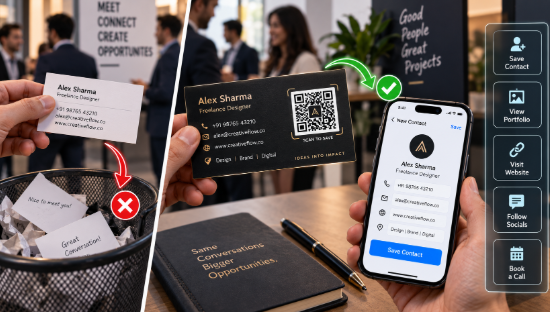
Somewhere in a coat pocket right now there is a business card belonging to someone who would have been perfect for a project that started last month.
The card was not lost. It was received, pocketed, and then never converted into anything, because converting a card into a contact requires opening your phone, typing a name, typing a number, typing an email, checking you got the email right, and saving. Roughly ninety seconds of fiddly work, standing up, usually while a conversation is still happening.
Nobody does it. Cards go in pockets, pockets go in wardrobes, and the connection quietly expires.
That is the failure mode a code fixes, and it is worth understanding precisely, because it is not the failure most people think it is. The problem is not that cards are outdated. It is that the transfer step is too much friction at the exact moment when the interest is highest.
The contact card, done properly
A code on a card can carry your full contact details directly, in a format phones understand natively. The person scans it, their phone offers to create a contact with your name, number, email, company, and website already filled in, and they tap once.
One tap versus ninety seconds. The conversion rate difference is not subtle.
Worth knowing: this can be done as a static code, meaning the details sit inside the pattern itself with no service in between. It will work in eight years with no subscription and no dependency. For contact details that rarely change, that is exactly what you want. Use a straightforward qrcode generator, pick the contact card format, fill in your details, download at high resolution, and hand it to your printer.
One caveat. If your phone number changes, every printed card is stale. Print in smaller batches than you think you need. Most freelancers over-order cards by a factor of four anyway.
The portfolio question
Second most valuable use, and this one depends entirely on what you do.
If your work is visual, the card should lead somewhere visual. Photographers, designers, illustrators, architects: the card cannot show the work, and describing it in words is a losing game. A code linking directly to a tight portfolio, twelve pieces rather than ninety, converts far better than a card that just says “photographer”.
Send them to a purpose-built page, not your homepage. Somebody scanning a card ten minutes after meeting you is in a very specific state of mind, and a page that opens with your best three pieces and a booking link matches it. A homepage with a navigation menu does not.
If your work is not visual, this matters less. A consultant or a copywriter is usually better served by the contact card use than the portfolio one.
Beyond the card
Invoices. A code linking to the payment page. Sounds small, saves genuine time, and gets you paid a few days earlier because the client can pay from the invoice rather than logging into banking and retyping account numbers. For freelancers, that few days compounds.
Proposals and PDFs. A code linking to a walkthrough video where you explain the proposal in your own voice. Clients who watch a two-minute video accept proposals at a noticeably higher rate than clients who only read one, because tone survives video and does not survive PDFs.
Conference badges and lanyards. A small code taped to the back of your badge, linking to your contact card. At events where you meet forty people in a day, this is the difference between forty saved contacts and four.
Email signature. Slightly niche, but useful if people print your emails or view them on a desktop while their phone is nearby.
Your laptop lid. Half joking. Only half. If you work in cafés and co-working spaces, a small code on the lid linking to your portfolio has started more conversations for some people than any amount of networking.
Design notes for cards specifically
Cards are small, and this creates real constraints.
Keep the code at least a centimetre and a half square, ideally two. Below that, on the matte uncoated stock most designers prefer, scanning becomes inconsistent. Uncoated stock absorbs ink and softens edges, which is precisely what QR codes hate.
Give it clear space. The quiet zone around the code must stay empty. Designers routinely run the code right to the edge of a card for aesthetic reasons and break it in the process.
Do not use spot UV or foil over the code. Glare defeats cameras, and a foiled code photographed under a spotlight at a conference is a code that does not work.
Say what it does. “Scan to save my details” under the code roughly doubles the number of people who bother. Without a label, most people assume it goes to a website and skip it because they can see the website address already printed on the card.
The honest expectation
This does not make you memorable. A code cannot do that. The conversation does that.
What it does is ensure that when somebody remembers the conversation three weeks later, your details are in their phone rather than in a coat pocket in a wardrobe.
That is a narrow benefit, precisely stated. It is also the specific point where most freelance networking currently leaks.
Fix that leak first. It is cheap to do, it takes about four minutes to generate a QR code with your contact details, and the next print run costs the same as the last one.
Then go back to worrying about the conversation, which is the part that actually matters.
FAQ
What is a vCard QR code? A code containing your contact details in a standard format. Scanning it prompts the phone to create a new contact with the fields already completed, rather than opening a website.
Should a business card code link to my website or my contact details? Contact details, in most cases. Your website address is already printed on the card, so the code adds most value by removing the manual typing step.
How small can a QR code be on a business card? Around one and a half centimetres square is the practical minimum, and two is safer on uncoated stock. Leave clear space around it.
Will the code still work if I change my phone number? A static contact code will keep giving out the old number. Print cards in smaller batches, or link to a contact page on your own site that you can update.
Can I put a QR code on an invoice? Yes, linking to a payment page. It removes the step where a client has to log into banking and retype details, which tends to shorten payment times.